Showing posts with label video. Show all posts

Plan With Me For December 2017


Hello everyone and how is your December going?  I hope your holiday season is enjoyable for you so far, no matter what special day(s) your are celebrating.   This month is busy for me, as expected, but it has been pleasant at the same time.  And, because I want this season to remain a happy time and not get too crazy, I decided to keep my bullet journal simple with fewer entries.  And, like last month, my spreads may look a bit atypical.  I won't have any weekly logs and have replaced them with other types of entries that work better for me at this time.


I used the Holiday Memories Planner Stickers Digital kit, by Little Bit Shoppe, on some of these spreads. You can find this store at the DigiChick digital scrapbooking site.   You can watch my planning video here:


If you'd like a good look at my pages,  here you go:


My holiday "brain dump" page will stand in for my weekly spreads.  I would rather just have a place to write down things I think of spontaneously and need to get done.  This list will be comprised of non-Christmas tasks, appointments, and other things that I need to remember and get done.  None of the weeks in December will be like my "normal" weekdays, I think I will find it easier to just have one place to write down things I want to do during the month.


This is another spread that I think will serve me better than weekly spreads this time around.  I have a running to do list of things related to the holidays that I want to get done.  Having my holiday tasks separate from my everyday chores and appointments helps me to not feel so overwhelmed, and I can check them off as I go. 

Additionally, when I get bogged down between daily and holiday to do lists, I often forget fun things I want to do like watch my favorite Christmas movies and shows, and making treats with the kids often goes out the window.   I'm glad to have this written down in one spot so the fun stuff won't get neglected. 


I love advent calendars and counting down the days, so I couldn't resist putting one in my BuJo.   I decided to write down one scripture a day through Christmas.  If scriptures are not your thing, you could easily write down a holiday quote daily, or holiday song lyrics, or your favorite things about the holidays.  This page spread is easy to customize. 

Remember when I said I would be doing fewer spreads?  Well, that's all of them for now. 

My goal for my next blog post is to show you how I'm setting up my Journal Your Christmas album for the 2017 season.  Stay tuned for that and it's coming as soon as I can pull it all together!

Enjoy the magic of this great time of year!
Plan With Me --- September 2017


Hey everyone, I hope you are all doing well and enjoying the change of seasons.  Here in Idaho, there's lots of beautiful Fall color going on:


Here are my page spreads for September.  I hope you enjoy them.  I will include appropriate links for any items and/or products I used on my spreads (or any borrowed ideas I incorporated).  I always try to give credit to others who have inspired me.


 First up is my September calendar, and in place of a habit tracker, I decided just to leave a space to write some things I accomplished this month.  I thought it might be more encouraging to actually record my successes instead of trying to keep up with a habit tracker.  I often forgot to fill in the tracker or got frustrated because I didn't get as much done as I hoped, so I decided to give it a rest for now.  I felt a lot more productive and positive seeing what I got done, rather than what I didn't.


Lettering Style Used for the Gratitude Log Title: Love Stamps
Where to find the September 17th Oodles of Doodles: Sept. 2017 Oodles of Doodles


 Here is what I did for my gratitude log, Oodles of Doodles challenge, and my August memories.  It was especially fun to document the eclipse!  I wasn't sure if I'd be able to draw the sun with the corona, but I think it turned out pretty good!

Here is a link to my pinterest board that shows the lettering style I used for my title on this page: title lettering style


And, for my mood tracker, I decided to change it up again, so I went with another linear format.  I had a light bulb moment where I remembered that abacuses (or abaci?)  are a great way to show a linear record of something, so I came up with my own abacus after looking at google images and deciding what type I wanted to draw.  It's fun, but it's also super easy to see which of my moods are predominating.

Lettering style used on my September Memories Page: Nova Lettering Style


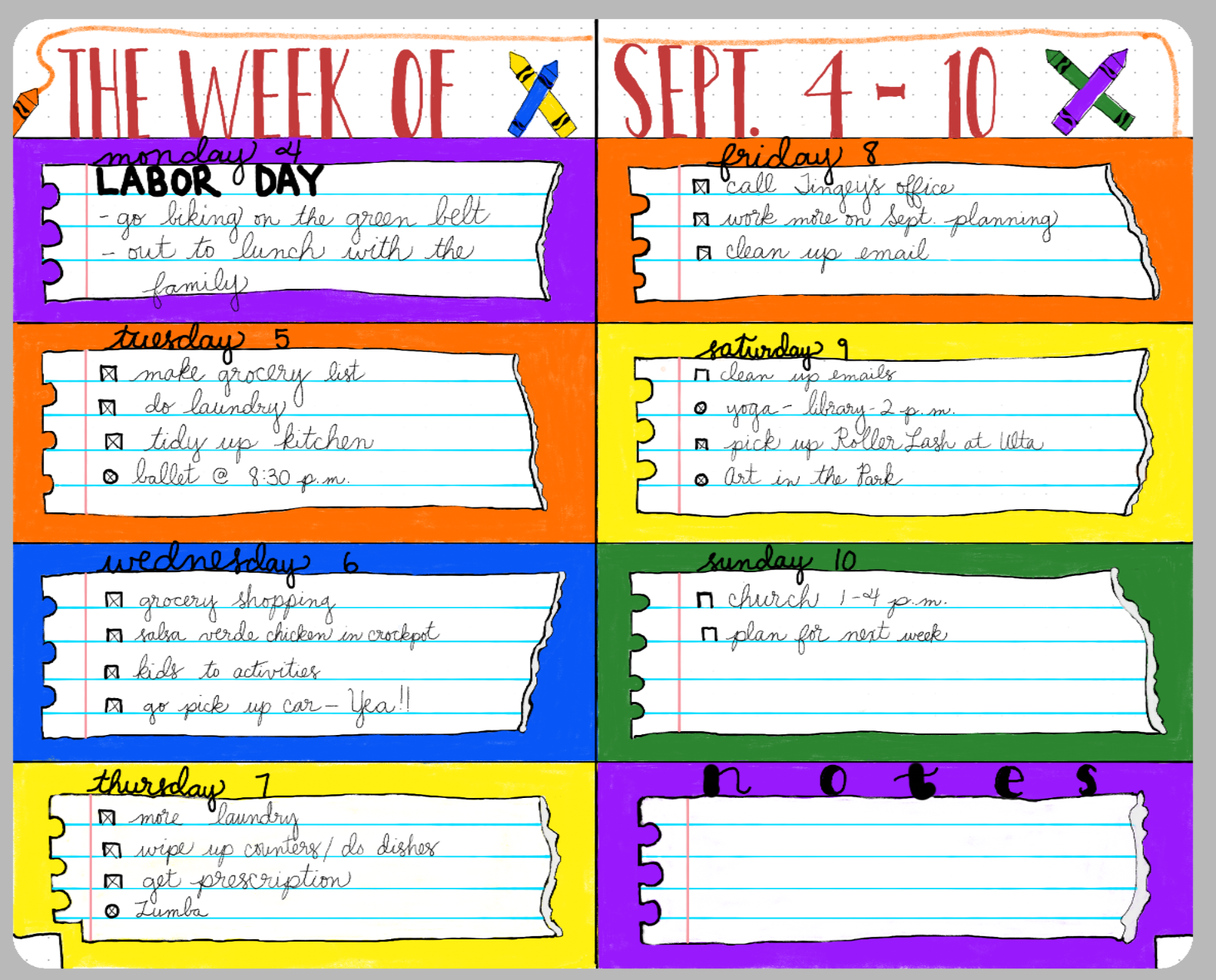
 The last spread I wanted to share with you guys is the one I'm the most proud of.  I came up with the idea on my own.    I decided to make one of my weekly Spreads with a school theme, and for each of the blocks I created for a day of the week, I made it look like a torn piece of spiral notebook paper:


Check out the video I posted to get a better idea of how I created the torn edges:


Also, I said that I would write down the colors I used from each palette in the Morpholio App in case you wanted to recreate this yourself:

Purple: from the Engineering color scheme (it's the only purple in that grouping).
Orange: from the Automotive color scheme (in the second row, the second color from the right edge).
Red: find it in the Automotive scheme (in the the first row, just after the darkest black).
Yellow: from the Diagrams scheme (first row, third color from the left).
Blue:  find it in the Comic Art scheme(second row, the only blue in that grouping)
White: You'll see it in the first color scheme at the top of the Palettes tool, in the grouping called "Trace."  It's the only white there.
Light Blue lines on Notebook paper: this color's in the Engineering scheme.  You'll see it on the second row of hues, right after the lime green color.
Black:  also from the Trace color scheme.
Faint gray used to create paper tears: The very first color in the Automotive palette. 


Alright then, guys!  I hope you are enjoying bullet journaling this month, and feel free to contact me with any questions.  Let me know what has been working well in your bullet journal this month.

Thanks again for being here!

Five Great Reasons To Try Digital Scrapbooking

I made a video in response to questions I've had from other scrapbookers over the years about why I switched to digital scrapping, and thought I would share why I love and enjoy it so much:


If you aren't one for leaving comments on YouTube, feel free to comment here about what your thoughts are about digital scrapbooking...I'd love to hear any constructive comments.

Here are photos of the pages I featured in my video, if you'd like to get a better look at them:


Also, if you need the link to the Adobe PSE free trial, here it is: Free trial for PSE15

Thanks & have a great day,


Video: Loading vs. Installing Brushes


Here's a video on my thoughts about installing and loading brushes, as well as the advantages to each method.

I hope you guys enjoy watching this --- I think Photoshop Brushes don't get all the love they deserve.  You can do so many cool things with them, and you are limited only by your imagination!  Here are some of my favorite ways to use brushes in PSE:

 Painty splats made with brushes can be awesome and unique ways to ground a photo, and it's nice variety from using standard photo mats.


Another fun use is to to ink or paint up the edges of a patterned or solid paper, like I did here with the aqua cardstock: 


Brushes can also add fun texture to a page that needs that little extra "something to make a page feel finished.  On this "Speed Racer" page,  I used a brush that looks like tire tread marks to reinforce the theme of the page.


In a few more days, I will have a video that will talk you through the process of creating a new layout using brushes, and it will show you how fun and easy they are to work with.

Let me know what you think of the video and/or this post.

I appreciate you stopping by and have a great day!

I'm Back (With Some Fun News)!

Ya'll probably thought I'd dropped off the face of the earth, right?

The only thing I can really say is that life got in the way for a couple of years, my family had some needs, and my attention had to be somewhere else for awhile.  I also chose to resign from my creative teams, and while I was sad to lose the privilege of working with awesome digital designers, I needed a break.  I had to take some time to recharge my batteries after feeling pretty exhausted and burnt out. 

I hope you guys are ready to hear from me again, as I plan to be back and posting more.  I'm excited to be back, and have something I'm so thrilled to tell you!

I've been doing some digging and researching online, and I've discovered that there aren't many digital scrappers sharing projects much on YouTube.  There are quite a few videos that center around tutorials (which I will do some of the time), Photoshop courses, or digital designers highlighting their kits. However, there are not so many that show work on projects using products from a variety of designers, stores, etc.  I also noticed that while there are tons of traditional scrapbookers and card makers sharing their layouts and projects, there are not many digital and hybrid scrappers/paper crafters doing so on YouTube...or maybe not so many that I felt like I found interesting and wanted to watch. 

It's funny to me that I kept waiting and waiting for someone else to make that kind of content, and it didn't dawn on me to do it myself.  I confess I was super intimidated by the very idea of making videos, but I decided to bite the bullet and give it a go.

I've been watching YouTube videos on a few different topics for about 2.5 years now, and kept track of how the creators of those videos made good content, how they engaged their audiences, best practices they used, and even took some online lessons on video creation from YouTube itself.

And while I am still very much a beginner, and have much to learn, I've gone ahead and created my own channel.  I waffled for a few months, and felt scared, especially after reading all the mean comments that get left on some of the channels out there.  I also worried that my videos would suck!
But, in the end,  I feel like it's more important to put myself out there and share my channel even if it scares me.  That's how we grow, right?  We take risks and learn what they teach us.

With all of that said, though...I love connecting with other scrapbookers, and I hope my channel will provide another place for people who love this hobby as much as I do to connect, learn, and have discussions about it.

So, awesome followers and readers...if you feel so inclined, I'd be grateful if you'd watch my first video, leave me some constructive feedback, and subscribe so you can see more of my videos.   I'd love to have you come along as I embark on my journey into the YouTube Realm.  I included the video here below, and will have a YouTube widget up soon along with the rest of my social media widgets at the top of the page.


As always, I appreciate all of you stopping by and spending part of your day here.

Thanks and talk to you soon,