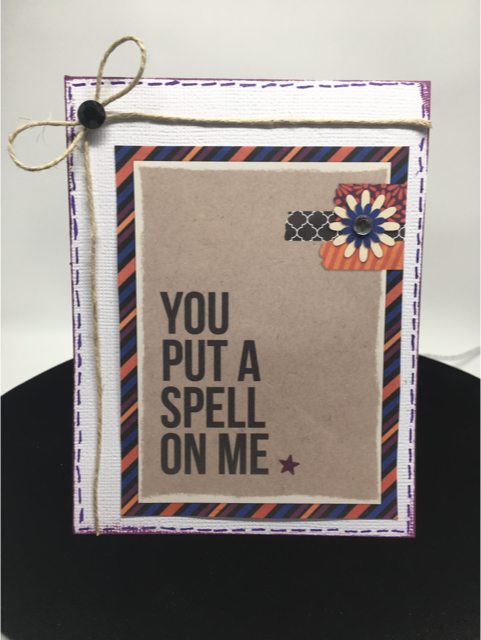
Video: Set of Four EASY Halloween Cards

Halloween is almost here, and I wanted to make a fun hybrid project in honor of the day.  Rather than focusing on treat bags or decorations, I prefer to make cards!!


I personally think that Halloween cards should be as popular as Christmas or Birthday cards...there's so many cool and silly ways you can use the theme of Halloween to create an adorable card to send to a friend.  

To make my cards, I used two kits from a collaboration done by Sahlin Studio and Britt-ish Designs who both create designs for the Lilypad: 


I divided this tutorial up into 2 videos, since I thought watching one very long one might get tiring.

 Here is part one: 


Also, here are the other digital supplies I used (or close substitutes) on these cards if you are curious or want to pick them up yourself:

Bebas Neue Font

Digital Distressing kit by Nancie Rowe Janitz

The Part Two video:


 Traditional scrapbooking supplies used (all are clickable links):

Hero Arts Yellow Gemstones
Recollections Adhesive Rhinestones - Black
The Paper Studio Le Petites Mini Paper Bows
3/8 in. Orange Gingham Ribbon
Queen & Co. Rhinestones in Snowflake
American Crafts White Cardstock
Aleene's Original Tacky Glue
Mini Jute String
Gelly Roll Pens in Black and Purple
Mini Glue Dots
Ranger Distress Ink in Seedless Preserves
Ranger Archival Ink in Black
Epson Matte Presentation Paper


Here is a close up look at the finished cards if you want to get a closer look:


Have a splendid day!!

Five Great Reasons To Try Digital Scrapbooking

I made a video in response to questions I've had from other scrapbookers over the years about why I switched to digital scrapping, and thought I would share why I love and enjoy it so much:


If you aren't one for leaving comments on YouTube, feel free to comment here about what your thoughts are about digital scrapbooking...I'd love to hear any constructive comments.

Here are photos of the pages I featured in my video, if you'd like to get a better look at them:


Also, if you need the link to the Adobe PSE free trial, here it is: Free trial for PSE15

Thanks & have a great day,


Using Photoshop Brushes on a Layout


You guys wanna see how easy and fun it is to use brushes on a digital scrapbook page?  If so, then I have a helpful video for you on how to do just that.  It's a follow up of my previous one, where I demonstrated how to either load or install brushes.

To create this page, I used Mye De Leon's Fleeting kit, which is so fun and pretty:


http://www.snapclicksupply.com/fleeting-complete-kit


I also used this add on brush kit of hers to demo using brushes to create part of a title:


http://www.snapclicksupply.com/fleeting-stamps

And, last but not least, I also incorporated some of these fun tapes from this coordinating add on kit:


All three of these great kits can be found at the Snap Click Supply Online Store, if you are interested in picking up these kits or any others. 

Here's the video, if you like it and wouldn't mind, then give it a thumbs up on YouTube and subscribe to my channel.  I would love to have you as followers: 


Also, as a thank you for watching my video and visiting my blog, I have a free template download for you.  I recreated the bones of my layout into templates --- there's one in 8.5 x 11 and another in the 12 x 12 size. 


Thanks again, for taking time to be here.  Have a wonderful day!!

Video: Loading vs. Installing Brushes


Here's a video on my thoughts about installing and loading brushes, as well as the advantages to each method.

I hope you guys enjoy watching this --- I think Photoshop Brushes don't get all the love they deserve.  You can do so many cool things with them, and you are limited only by your imagination!  Here are some of my favorite ways to use brushes in PSE:

 Painty splats made with brushes can be awesome and unique ways to ground a photo, and it's nice variety from using standard photo mats.


Another fun use is to to ink or paint up the edges of a patterned or solid paper, like I did here with the aqua cardstock: 


Brushes can also add fun texture to a page that needs that little extra "something to make a page feel finished.  On this "Speed Racer" page,  I used a brush that looks like tire tread marks to reinforce the theme of the page.


In a few more days, I will have a video that will talk you through the process of creating a new layout using brushes, and it will show you how fun and easy they are to work with.

Let me know what you think of the video and/or this post.

I appreciate you stopping by and have a great day!

I'm Back (With Some Fun News)!

Ya'll probably thought I'd dropped off the face of the earth, right?

The only thing I can really say is that life got in the way for a couple of years, my family had some needs, and my attention had to be somewhere else for awhile.  I also chose to resign from my creative teams, and while I was sad to lose the privilege of working with awesome digital designers, I needed a break.  I had to take some time to recharge my batteries after feeling pretty exhausted and burnt out. 

I hope you guys are ready to hear from me again, as I plan to be back and posting more.  I'm excited to be back, and have something I'm so thrilled to tell you!

I've been doing some digging and researching online, and I've discovered that there aren't many digital scrappers sharing projects much on YouTube.  There are quite a few videos that center around tutorials (which I will do some of the time), Photoshop courses, or digital designers highlighting their kits. However, there are not so many that show work on projects using products from a variety of designers, stores, etc.  I also noticed that while there are tons of traditional scrapbookers and card makers sharing their layouts and projects, there are not many digital and hybrid scrappers/paper crafters doing so on YouTube...or maybe not so many that I felt like I found interesting and wanted to watch. 

It's funny to me that I kept waiting and waiting for someone else to make that kind of content, and it didn't dawn on me to do it myself.  I confess I was super intimidated by the very idea of making videos, but I decided to bite the bullet and give it a go.

I've been watching YouTube videos on a few different topics for about 2.5 years now, and kept track of how the creators of those videos made good content, how they engaged their audiences, best practices they used, and even took some online lessons on video creation from YouTube itself.

And while I am still very much a beginner, and have much to learn, I've gone ahead and created my own channel.  I waffled for a few months, and felt scared, especially after reading all the mean comments that get left on some of the channels out there.  I also worried that my videos would suck!
But, in the end,  I feel like it's more important to put myself out there and share my channel even if it scares me.  That's how we grow, right?  We take risks and learn what they teach us.

With all of that said, though...I love connecting with other scrapbookers, and I hope my channel will provide another place for people who love this hobby as much as I do to connect, learn, and have discussions about it.

So, awesome followers and readers...if you feel so inclined, I'd be grateful if you'd watch my first video, leave me some constructive feedback, and subscribe so you can see more of my videos.   I'd love to have you come along as I embark on my journey into the YouTube Realm.  I included the video here below, and will have a YouTube widget up soon along with the rest of my social media widgets at the top of the page.


As always, I appreciate all of you stopping by and spending part of your day here.

Thanks and talk to you soon,